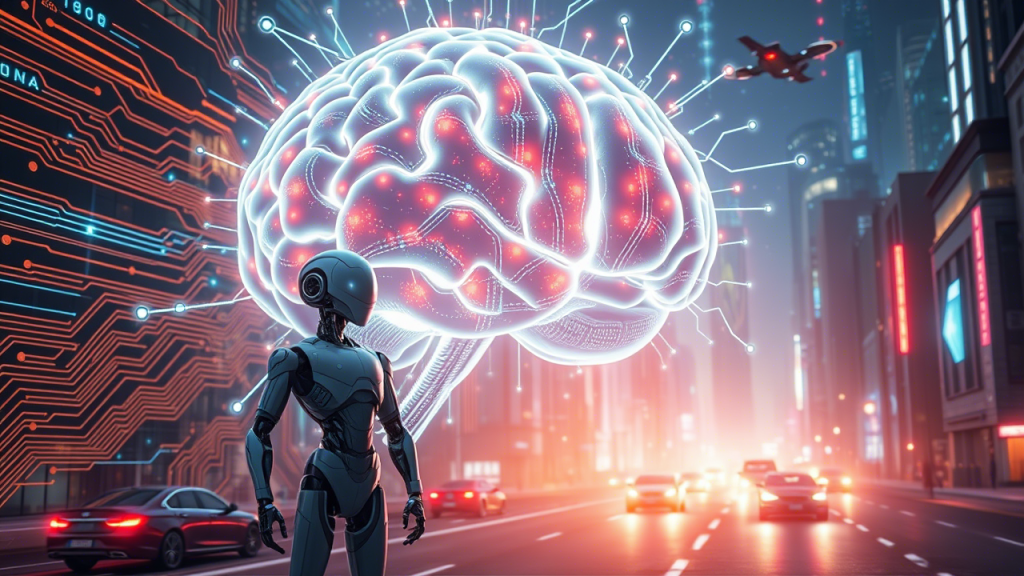
From Basic Process Control to Digital Life: How AI, AO, DI, DO Mirror a Bigger Evolution

If you’ve ever worked with process control or basic instrumentation, you’ve probably heard the terms AI, AO, DI, DO — Analog Input, Analog Output, Digital Input, Digital Output. These are the foundation of how machines see, respond, and act.

But what if we apply that same logic to the evolution of intelligence and digital life?

Let’s break it down:

1. Humans → AI (Analog Input)

We humans create systems that try to sense the world and process information — just like analog input devices do in control systems.

That’s what Artificial Intelligence (AI) is: systems that can mimic human thinking, recognize patterns, and make decisions based on data.

AI is like the Analog Input of the digital evolution — it receives signals from the world and starts processing.

2. AI → AO (Analog Output)

Once AI is built, it doesn’t just sit there. It can create outputs — actions, decisions, even smart agents.

These smart agents, such as game bots or reactive robots, are early versions of Artificial Organisms (AO).

They’re basic, but they can act based on what they “sense.” Just like Analog Outputs, they take processed info and do something with it.

3. AO → DI (Digital Input)

Over time, these Artificial Organisms evolve — they begin to learn, react more accurately, and process discrete, logical decisions.

At this stage, we get Digital Intelligence (DI) — systems that go beyond reacting and start making meaningful decisions.

This mirrors Digital Inputs, which are about sensing discrete, clear states — on/off, yes/no — critical for automation logic.

4. DI → DO (Digital Output)

Now things get interesting.

Once DI becomes advanced enough, it starts creating its own systems — ones that can survive, adapt, and maybe even evolve.

These become Digital Organisms (DO) — entities that live entirely in digital ecosystems.

Just like Digital Outputs, they make decisive actions in response to discrete inputs and intelligence.

So, is this just a metaphor?

Yes — but it’s a powerful one.

The AI → AO → DI → DO journey is not only a way to understand digital evolution, but it also beautifully mimics the control logic that runs our factories, plants, and machines.

It’s a reminder that sometimes, the simplest engineering concepts can help us imagine the future.

🔧 Taglines worth remembering:

AI is the sensor. AO is the actuator. DI is the decision. DO is the execution.

#AI #ProcessControl #DigitalLife #Instrumentation #Automation #TechThinking #SimpleLogic
A Journey I Want My Children to Remember

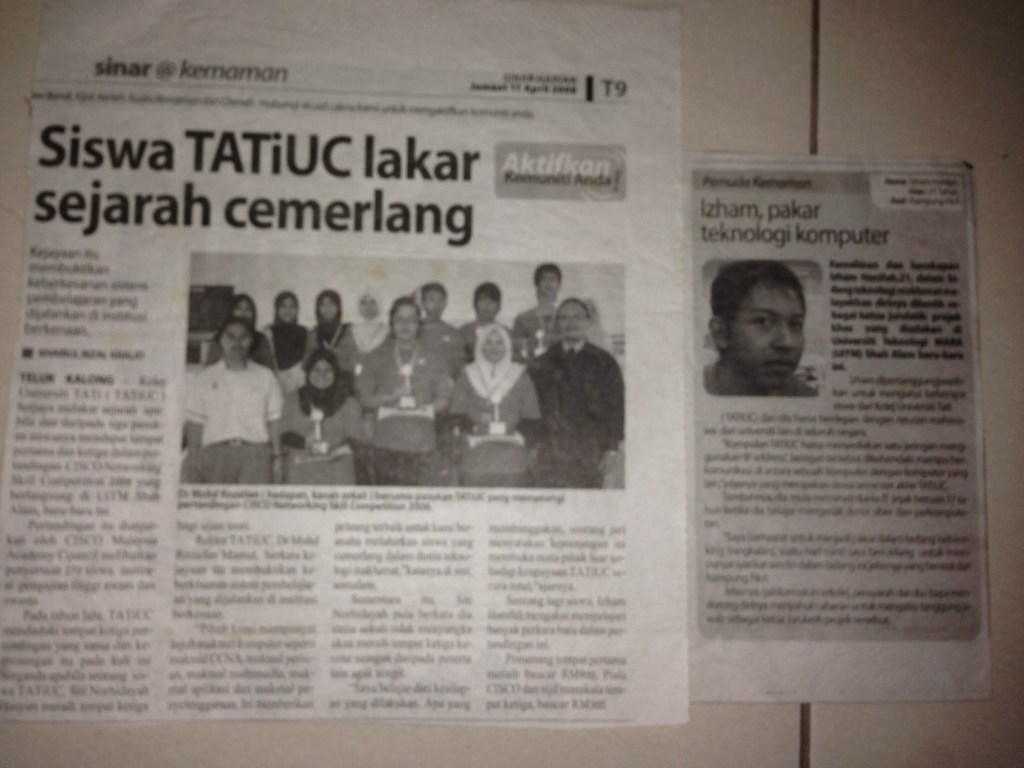
My name is Ezham Hanifah, and I come from Kemaman. I’m not someone with high education or big titles. I didn’t go overseas, and I didn’t start my life with everything ready. But I always believed that if I keep learning, step by step, something good will happen.

After I finished SPM, I started my diploma at TATI University College. I didn’t know much back then, but I was very curious about computers. I explored IT on my own—networking, cybersecurity, and how systems work. I didn’t have fancy tools or classes. I just used what I had and learned bit by bit.

At 21, while still a diploma student, I got a chance that changed my life. I was selected to lead a student network project at UiTM Shah Alam. It was a national event. I had to guide a team and set up a full computer network system using IP addressing. That moment gave me confidence. It made me feel like maybe, even though I came from a small place, I could do something meaningful.

Since then, I’ve worked in IT for over 15 years. I’ve handled many systems—SAP, VPNs, email, firewalls, servers, networks, and more. I’ve managed infrastructure, supported users, and learned how to keep systems running smoothly. I always believed: don’t wait to be the best—just start, and grow every day.

Now, I’ve stepped into a new field—plant automation and control systems. I’m learning DeltaV, DCS, and how technology connects to real plant operations. This is something new for me, but I like the challenge. I believe the future is about combining IT and automation. So I’m preparing myself for that future, even if it’s tough at first.

To be honest, I’m not always proud of myself. I feel shy to share these things. But today, I write this blog not to show off—but to leave something behind.

One day, I hope my children will read this.

I want them to know that their father started with very little, but he didn’t give up. He kept trying. He kept learning. He worked hard not to be rich or famous, but to give his family a better future.

If you’re reading this, and you’re on your own journey—just remember, it’s okay to start small. Just don’t stop moving.

This is my story. And it’s still being written.

AGI and ASI: The Future of Intelligence and Humanity’s Last Invention

Artificial Intelligence has already transformed our lives in many ways. From recommending music on Spotify to self-driving cars, AI is no longer just a futuristic concept. But what if I told you we’re on the brink of something much bigger? Enter AGI (Artificial General Intelligence) and its even more powerful cousin, ASI (Artificial Superintelligence).

These two stages of AI aren’t just upgrades—they’re the next leap in human evolution. And, perhaps, they’re the last invention humanity will ever need to make.

What is AGI?

AGI is the holy grail of artificial intelligence. Unlike today’s narrow AI, which excels at specific tasks (think Siri or Google Translate), AGI would be capable of doing anything a human can do. Picture an AI that can read a textbook, understand it, apply the knowledge, and even improve upon it. It could write software, design cars, compose symphonies, and solve complex scientific problems. In short, an AGI could function as a human brain, but faster, more efficiently, and tireless.

This is where things get exciting. Once we build AGI, it will have the potential to improve itself, creating smarter versions of itself. This means, theoretically, an AGI could continue evolving without human intervention, getting smarter by the second.

And then there’s ASI…

But AGI is just the beginning. What happens when we push intelligence beyond human limits? Enter ASI—Artificial Superintelligence.

Imagine an AI so advanced, it surpasses the smartest human minds in every single field. Think of an ASI being able to:

Solve the world’s most complex scientific puzzles in minutes. Cure diseases or end hunger with algorithms. Create technologies and concepts that we can’t even comprehend today. Predict the future with unimaginable accuracy.

If AGI is like a highly advanced human brain, ASI is more like a super-brain that not only outsmarts humans but does so on a scale that’s nearly incomprehensible. It’s like trying to understand the thoughts of someone who has billions of years of processing power in just a second.

Why is AGI Humanity’s Last Invention?

Here’s the kicker: once AGI is created, it might be the last major invention we ever make. Why? Because once we have AGI, it could invent the next big things itself. It could improve its own design, create new technologies, and solve problems we haven’t even thought of yet. Essentially, we would create a machine capable of inventing beyond our own imagination.

In a way, AGI is the last step for humanity to take. After that, we enter a world where humans are no longer the smartest beings on Earth—our creations are.

When Will It Happen?

So, when can we expect AGI, and eventually ASI? Experts have been guessing for years, but the consensus is that AGI could be just a few decades away—some say by 2030 to 2040. Once AGI is around, ASI could follow within years, maybe even months, as the intelligence of these systems will grow exponentially.

What Does This Mean for Us?

We are at the edge of something massive, something that could either be humanity’s greatest triumph or our biggest challenge. If we build AGI and ASI carefully, we could unlock untold advances in science, medicine, and space exploration. But if we misstep—if we fail to align these intelligences with human values—we could be facing a future where we no longer control our own fate.

It’s a thrilling, terrifying thought. The development of AGI and ASI will likely be the most important thing humans will ever do—and we’re just getting started.

In the grand scheme of things, AGI might be the last invention humanity ever needs to make. Everything that follows could be a result of its own creation. The question is: are we ready for that?

In-Place Active Directory Upgrade to Windows Server 2012 R2 Standard: Detailed Steps

In June 2024, I undertook the task of upgrading one of our core Active Directory (AD) servers from Windows Server 2008 R2 to Windows Server 2012 R2 Standard. This was the second attempt after the initial upgrade failed. While our original plan was to migrate to Windows Server 2016, time constraints led us to stick with Server 2012 R2 for this upgrade cycle.
The existing environment consisted of:

ServerA: Running Windows 2008 R2 (primary AD server to be upgraded)
ServerB: Windows 2012 R2 (upgraded in a previous session)
ServerC: Windows 2012 R2 (upgraded in a previous session)

The servers were hosted on different Hyper-V hosts, with ServerA on Host1, ServerB on Host2 (part of a clustered Hyper-V setup), and ServerC on Host3 (a standalone Hyper-V server).

Here are the detailed steps I followed for the in-place upgrade:

  • Rebooted ServerA, ServerB, and ServerC in sequence and took full system snapshots of each.
  • On a ServerA, ran ‘netdom query fsmo’ to identify the FSMO role holders. Transferred all FSMO roles from ServerA to ServerB using ‘ntdsutil’ commands.
  • Backed up certificates and removed the Certification Authority (CA) from ServerA, as this is a prerequisite for the OS upgrade path.
  • Uninstalled the antivirus software (SEP) on ServerA and rebooted.
  • Took another round of snapshots for all three servers.
  • Initiated the in-place upgrade process on ServerA to install Windows Server 2012 R2 Standard. This failed after multiple attempts.
  • Investigated the issue and found that migrating ServerA to a different Hyper-V host resolved the problem. The upgrade then completed successfully.
  • Activated the KMS license and rebooted ServerA.
  • Using ‘ntdsutil’ again, transferred the FSMO roles back to ServerA and thoroughly tested all three server roles.
  • Installed the Active Directory Certificate Services (AD CS) role and loaded the required certificates.
  • Rebooted ServerA, verified all services were running correctly, and took a final snapshot.
    Installed the latest patch updates on ServerA, ServerB, and ServerC.

With this process, all three AD servers are now running Windows Server 2012 R2 Standard, having overcome the initial failed upgrade hurdles on the primary domain controller.
While this was a lengthy process, following the recommended steps and being persistent in troubleshooting the issues eventually led to a successful outcome. For anyone undertaking a similar in-place AD upgrade, be sure to have proper backups, transfer FSMO roles during the process, and be prepared to try different steps (like migrating to a new host) if the initial upgrade fails.

Software Frameworks and Their Preferred Databases

When it comes to building applications, developers have a wide range of software frameworks to choose from, each with its own strengths and preferred databases. In this blog post, we’ll explore some popular software frameworks and the databases that are commonly used with them.

FrameworkLanguagePreferred Databases
Java Frameworks
Spring (Spring Boot, Spring MVC, etc.)JavaMySQL, PostgreSQL, Oracle, SQL Server
Jakarta EE (formerly Java EE)JavaMySQL, PostgreSQL, Oracle, SQL Server
Play FrameworkJavaMySQL, PostgreSQL, Oracle, SQL Server
GrailsJavaMySQL, PostgreSQL, Oracle, SQL Server
VaadinJavaMySQL, PostgreSQL, Oracle, SQL Server
Python Frameworks
DjangoPythonPostgreSQL, MySQL, SQLite, Oracle
FlaskPythonSQLAlchemy (MySQL, PostgreSQL, SQLite, Oracle, etc.)
PyramidPythonSQLAlchemy (MySQL, PostgreSQL, SQLite, Oracle, etc.)
FastAPIPythonSQLAlchemy (MySQL, PostgreSQL, SQLite, Oracle, etc.)
TornadoPythonSQLAlchemy (MySQL, PostgreSQL, SQLite, Oracle, etc.)
JavaScript Frameworks
ReactJavaScriptCan work with any backend database
AngularJavaScriptCan work with any backend database
Vue.jsJavaScriptCan work with any backend database
Node.js (with Express.js)JavaScriptMongoDB, PostgreSQL, MySQL, SQLite
Next.jsJavaScriptCan work with any backend database
MeteorJavaScriptMongoDB
PHP Frameworks
LaravelPHPMySQL, PostgreSQL, SQLite, SQL Server
SymfonyPHPMySQL, PostgreSQL, SQLite, SQL Server
CodeIgniterPHPMySQL, PostgreSQL, SQLite, SQL Server
YiiPHPMySQL, PostgreSQL, SQLite, SQL Server
CakePHPPHPMySQL, PostgreSQL, SQLite, SQL Server
WordPressPHPMySQL
Ruby Frameworks
Ruby on RailsRubyMySQL, PostgreSQL, SQLite, SQL Server
SinatraRubyMySQL, PostgreSQL, SQLite, SQL Server
HanamiRubyMySQL, PostgreSQL, SQLite, SQL Server
Go Frameworks
GinGoMySQL, PostgreSQL, SQLite, MongoDB
RevelGoMySQL, PostgreSQL, SQLite, MongoDB
BeegoGoMySQL, PostgreSQL, SQLite, MongoDB
EchoGoMySQL, PostgreSQL, SQLite, MongoDB
.NET Frameworks
.NET CoreC#SQL Server, MySQL, PostgreSQL, SQLite, Oracle
ASP.NET (Web Forms, MVC)C#SQL Server, MySQL, PostgreSQL, SQLite, Oracle
Xamarin (for mobile apps)C#SQLite, Azure Cosmos DB
C++ Frameworks
QtC++Can work with various databases using drivers or ORMs
GTK+C++Can work with various databases using drivers or ORMs
wxWidgetsC++Can work with various databases using drivers or ORMs
Rust Frameworks
RocketRustPostgreSQL, MySQL, SQLite, MongoDB
ActixRustPostgreSQL, MySQL, SQLite, MongoDB
NickelRustPostgreSQL, MySQL, SQLite, MongoDB
IronRustPostgreSQL, MySQL, SQLite, MongoDB
Software Frameworks and Their Preferred Databases

It’s important to note that many of these frameworks can work with multiple databases, and the preferred database choice often depends on the project requirements, performance needs, and personal preferences of the development team.

When choosing a software framework and database combination, it’s essential to consider factors such as scalability, performance, compatibility with existing systems, and the expertise of your development team. By selecting the right tools for the job, you can ensure that your application is built on a solid foundation and can meet the ever-changing demands of the modern digital landscape.

How to Transfer FSMO Roles in Active Directory

The Flexible Single Master Operation (FSMO) roles in Active Directory are a set of five critical operations that must be handled by a single domain controller at any given time. These roles ensure the consistency and integrity of the Active Directory database.

Sometimes, you may need to transfer one or more of these FSMO roles to another domain controller. For example, if you’re decommissioning an old domain controller that currently holds FSMO roles, or if you want to redistribute the roles for load balancing purposes.

To check which domain controller currently holds the FSMO roles, you can use the netdom query fsmo command. This will list the current role holders.

To transfer the roles, you’ll use the ntdsutil command-line utility along with the roles and connections options. Here are the steps:

  1. Open a command prompt on the domain controller you want to transfer the roles to.
  2. Run ntdsutil to start the utility.
  3. Run roles to enter the roles context.
  4. Run connections to switch to the connections context.
  5. Run connect to server servername.domain.com to specify the remote domain controller you want to transfer roles from.
  6. Run quit to go back up a level.
  7. For each role you want to transfer, run one of the following commands:
    • transfer infrastructure master
    • transfer naming master
    • transfer PDC
    • transfer RID master
    • transfer schema master
  8. Run quit again to exit ntdsutil.

Finally, run netdom query fsmo again to verify that the roles have been transferred successfully.

It’s important to carefully plan any FSMO role transfers, as they can impact Active Directory operations if not done correctly. Always make sure to follow best practices and have a rollback plan.

The Miracle of Moringa Seedlings

It’s only been a week, but the moringa seedlings are already putting on an inspiring show of life and vitality. When I look at those tiny sprouts pushing through the soil, bright green and determined, I’m reminded of the incredible potential contained within each minuscule seed.

Moringa, often called the “miracle tree” or “drumstick tree,” has been prized across cultures for its amazing range of nutritional and medicinal properties. The leaves are a powerhouse of vitamins, minerals, proteins, and antioxidants. Every part of the moringa plant has valuable uses – from the nutrient-rich pods to oils that benefit hair and skin.

But for now, my focus is on those first precious leaves unfurling. Seeing their tender shapes take form day-by-day fills me with hope and appreciation for the resilience of nature. From such humble beginnings, these moringa seedlings will grow into trees capable of nourishing people, animals, and the earth itself.

In our fast-paced world, cultivating moringa seedlings is a grounding experience. It requires patience, attentiveness to simple needs like water and sunlight, and faith in the inherent wisdom of natural cycles. These tiny lives remind me to slow down and marvel at the small miracles unfolding all around us when we take the time to notice.

I’ll be nurturing these moringa seedlings vigilantly over the coming weeks and months. I look forward to witnessing their transformation into strong, productive trees. With every leafy branch reaching for the sky, they’ll stand as a testament to the incredible potential for life, sustenance, and hope that can emerge from a simple seed.

Resolving ‘Naming Information Cannot Be Located’ Error: Troubleshooting Guide

If you’ve ever tried to join a computer to an Active Directory (AD) domain or perform certain domain-related operations, you may have encountered the frustrating “Naming Information cannot be located because: The specified domain either does not exist or could not be contacted” error. This error typically occurs when a client machine is unable to communicate with the domain controller (DC) for the domain it’s trying to join or access.

There can be various reasons behind this error, such as network connectivity issues, misconfigured DNS settings, or problems with the domain controller itself. Fortunately, there are several troubleshooting steps you can take to resolve this issue.

Step 1: Specify the WINS Server’s IP Address on the Client WINS (Windows Internet Naming Service) was an older technology used for name resolution in Windows networks before the widespread adoption of DNS (Domain Name System). While it’s not commonly used anymore, specifying the WINS server’s IP address on the client machine can sometimes help resolve the “Naming Information cannot be located” error.

To do this, follow these steps:

  1. Open the Network Connections control panel and access the properties of the local area network connection.
  2. Navigate to the TCP/IPv4 settings and go to the Advanced > WINS settings.
  3. Add the IP address of the WINS server, which is often the same as the domain controller’s IP address, to the WINS server list.

By providing the WINS server’s IP address, the client machine may be able to resolve the domain name and join the domain successfully.

Step 2: Check FSMO Role Status The Flexible Single Master Operation (FSMO) roles are special operations in Active Directory that must be carried out by a single domain controller at any given time. You can check the status of these roles using the netdom query FSMO command. If there are any issues with the FSMO roles, it could potentially cause problems with domain name resolution and communication with the domain controller.

Step 3: Modify the SysvolReady Flag The HKEY_LOCAL_MACHINE\SYSTEM\CurrentControlSet\Services\Netlogon\Parameters registry key contains various settings related to the Netlogon service, which is responsible for authenticating and joining computers to a domain.

The SysvolReady flag is a registry value that indicates whether the Sysvol (System Volume) folder, which contains Group Policy Objects (GPOs) and other AD-related data, has been fully replicated to the domain controller. Setting the SysvolReady flag to 1 forces the domain controller to assume that the Sysvol replication is complete, even if it’s not.

To modify the SysvolReady flag, follow these steps:

  1. Navigate to the HKEY_LOCAL_MACHINE\SYSTEM\CurrentControlSet\Services\Netlogon\Parameters registry key.
  2. In the details pane, right-click the SysvolReady flag and click Modify.
  3. In the Value data box, type 1, and then click OK.
  4. Reboot the server.

This step is often recommended as a troubleshooting measure when there are issues with Sysvol replication or when the domain controller is unable to locate the necessary domain information due to replication problems.

By following these steps, you may be able to resolve the “Naming Information cannot be located” error and establish successful communication between the client machine and the domain controller.

It’s important to note that these troubleshooting steps should be performed with caution, as modifying registry settings or network configurations can have unintended consequences if not done correctly. If you’re unsure about any of the steps, it’s recommended to consult with a qualified system administrator or IT professional.

Perbandingan Bitcoin dan Internet Pada tahun 1997

Bitcoin adalah masih dalam peringkat awal. Pada ketika ini, kurang dari 2% populasi dunia menggunakan Bitcoin & Crypto. Memandangkan jumlah populasi dunia sekarang lebih dari 7 bilion, ini adalah jumlah yang sangat kecil. Dengan hanya sekitar 130 juta orang yang menggunakan Bitcoin & Crypto sehingga hari ini. Jika dibandingkan dengan cara yang sama kebangkitan internet pada akhir tahun 90-an. Corak pertumbuhan BTC sekarang boleh dikatakan sama dengan corak pertumbuhan internet pada tahun 1997.

Kembali pada tahun 1997, internet pada ketika itu mempunyai kira-kira 130 juta pengguna. Ini adalah ketika dimana tiada yang menyangka internet akan pergi jauh. Jika dilihat ini adalah sentimen yang sama mengenai pertumbuhan Bitcoin & Crypto hari ini. Angka menunjukkan bahawa sama seperti pada akhir tahun 90-an, pelabur yang menggunakan bitcoin sekarang boleh dikategorikan orang terawal.

Penggunaan Internet dan Bitcoin

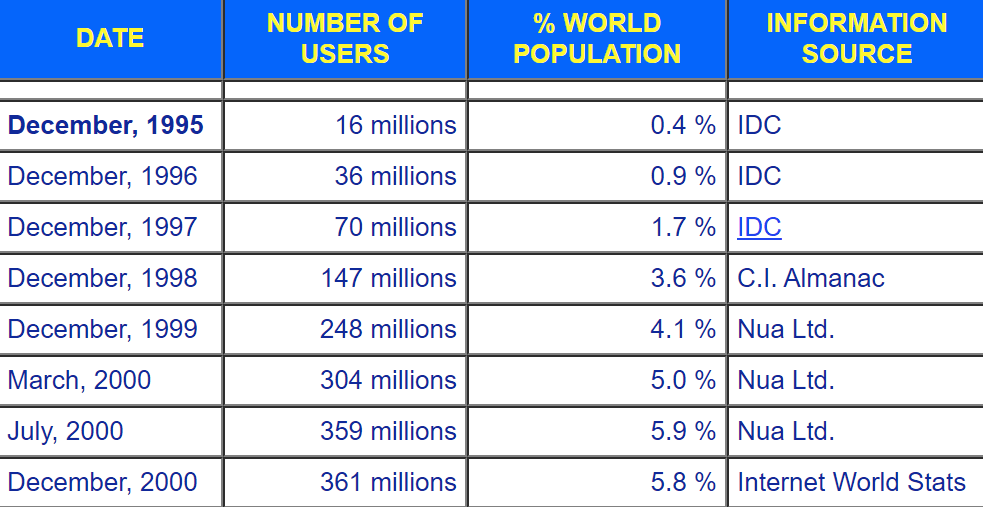
Internet bermula pada tahun 1983. Tetapi tidak ada penggunaan yang ketara sehingga tahun 1990-an. Ia bermula dengan perlahan sehingga menjelang tahun 1997, hanya sekitar 1.7% dunia benar-benar menggunakan internet. Sama seperti Bitcoin pada tahun 2021, sekarang adalah titik penting kepada bitcoin dan crypto.

Penggunaan internet meningkat dua kali ganda dari tahun 1997 hingga 1998 | sumber

Dalam masa setahun kemudian jumlah pengguna internet meningkat dua kali ganda. Pada tahun 2000, populasi dunia yang menggunakan internet telah melebihi 5%. Jumlah pengguna pada ketika itu telah melebihi dari 350 juta. Dari titik permulaan itu hingga tahun 2005, pengguna internet telah mencapai 1 bilion.

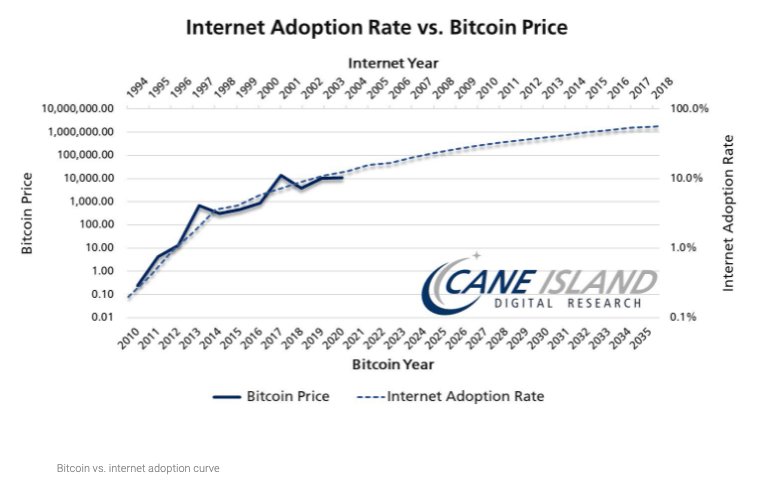
Perkembangan Bitcoin sama dengan perkembangan Internet | sumber

Harga Bitcoin telah menunjukkan pergerakan yang sama jika dibandingkan dengan penggunaan internet. Tetapi garis masa adalah sedikit berbeza. Internet mengambil masa beberapa tahun lebih lama untuk mencecah 130 juta pengguna. Tetapi corak pertumbuhan nya sangat serupa. Faktor Bitcoin cepat berkembang adalah disebabkan Bitcoin mempunyai bantuan internet yang mendorongnya mempercepatkan garis masa. Dengan membandingkan kedua pergerakan garis masa yang disesuaikan, bitcoin dijangka akan pesat berkembang dalam empat tahun akan datang. Pada ketika itu, jumlah pengguna bitcoin dan crypto dijangka mencecah 1 bilion. Ini akan menjadikan lebih ramai orang akan memiliki digital aset.